|
|
Top Previous Next |
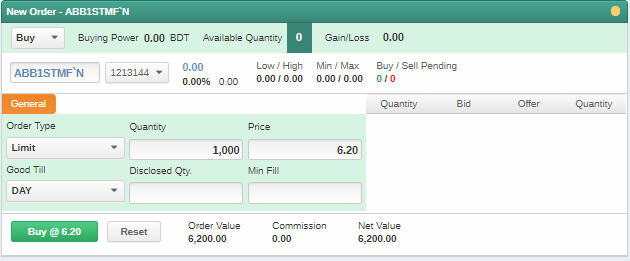
Order TicketThe Order Ticket module can be used to place buy / sell orders for a selected stock. TradeXpress provides you an easy to understand and efficient order entry interface. When placing an order, you should specify the portfolio details, symbol details, order type, price, quantity and order validity. After you select the symbol, the Market Depth by Price details are displayed in the window to give you a quick view of the symbol you are going to trade and the Order Value is displayed at the bottom of the window. Holding displays the number of shares you have already purchased from the symbol while Buy Pending and Sell Pending reflect any pending buy and sell orders you have entered for the symbol. Once you enter the order details, the Order Value is displayed. If the buy order value is above the buying power or if the selling quantity is more than the Holding, the order is rejected. After you place an order you can monitor its progress using the Order List.
Note : •Double click on a symbol's Bid Price to activate the Sell window. •Double click on a symbol's Offer Price to activate the Buy window.
PROCEDURE
To place an order: On the side panel select
A: Select the portfolio details •Select the portfolio from the Portfolio list.
B: Select the symbol (Refer to the Color Codes section on how to select a symbol) OR Enter the desired symbol
C: Enter the order type, quantity and price I.Select the order type from the list. (Limit or Market) II.Type the total quantity and price. Entering price is not mandatory for Market Orders.
D: Enter the order validity (Some of the fields will be dimmed if they are not permitted by the exchange.) •Select the validity from the Good Till list. Some of the fields will be dimmed if they are not permitted by the exchange or not applicable for the order types. To know more about the order validity periods available in TradeXpress, see Order Validity.
E: Optional order details Enter the quantity conditions: (Some of the fields will be dimmed if they are not permitted by the exchange.) •Disclosed Qty - If you select Disclosed Qty, only a part of the order quantity is disclosed to the market. The next part is automatically released after the previous order quantity. You can apply this to a very large quantity. If nothing is mentioned in the disclose quantity box then the entire buy/sell quantity is disclosed in the market i.e. all the traders in the market can see the total quantity for which the order has been entered. •Min Fill - If you select Minimum Fill, the order will get executed only if the minimum number of shares specified is filled.
2.Click Buy or Sell as applicable to place the order. A message opens inquiring to confirm the order. 3.Click Confirm Order.
Figure 01 - Order Ticket
|