|
|
Top Previous Next |
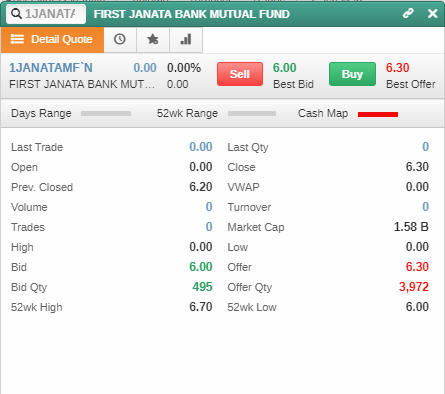
Detail QuoteUse this procedure to open the Detail Quote window to obtain an overview of the market including a graphical view of the selected symbol's performance. The Detail Quote window provides price and volume data, key information every investor needs to evaluate the performance of a security. The last price, its change, bid and offer price for the day are displayed on top of the window.
With the Buy / Sell buttons in the window you can react to the market instantly while you are on the Detail Quote window. You can view different symbols on the same window by typing the symbol code on the text box. Furthermore, you can link the Detail Quote window to the Full Market or to the Symbol list.
PROCEDURE
To view the Detail Quote: 1.On the side panel select 2.Navigate to the Detail Quote section.
OR
Double click on a symbol.
OR Search for a symbol name in the search bar
Figure 01 - Detail Quote
|
 .
.